
UPC labels,
made precise.
The CASESTUDY UPC Portal brings product data, label specifications, and production-ready orders into one controlled workspace.
Existing customersSign in to manage saved orders and product selections.
New to CASESTUDY?Create an account to begin your UPC label order.
PRODUCT DATA CONTROLORDER ACCURACYPRODUCTION READY
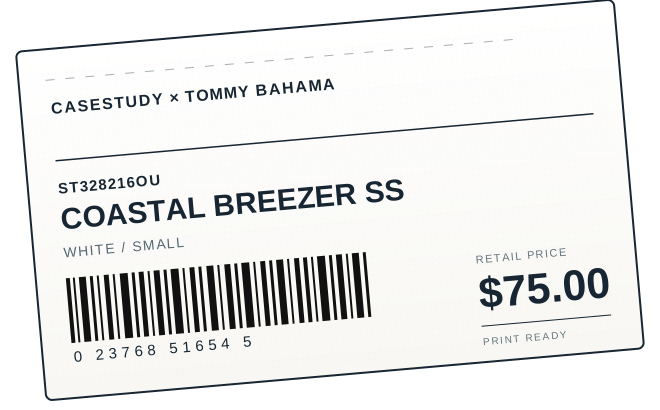
The workspace
Everything needed to take a label from selection to print.
01 / Select products
Create
order.
21 UPC records available
from the current product file.
Purchase Order Details Complete required information before saving or submitting
| Style No. | Style Name | Color | Size | Ticket set 1 | Qty |
|---|
Pre-submit review
0 / 5Order readiness
Complete the checks below before submitting.
0SKU lines0Labels0Estimated rolls
SKU lines0
Total labels0
Estimated rolls0
02 / Orders
My orders
| Order | Customer | Submitted | Action |
|---|
Catalog management
Product
catalog.
Catalog integrations & data toolsOptional catalog feeds, recovery, and data maintenance⌄
Catalog updates
Use a file import for active catalog maintenance. Optional EDI 832 feeds remain catalog-only integrations and never drive Tommy Bahama production orders.
Review a product file with SKU, UPC, price, quantity, and label design data.
Use only when a confirmed trading-partner catalog feed is required. It does not create, update, or release production orders.
Import review
Review catalog changes
0Added0Updated0Unchanged0Removed
Catalog updatedChanges applied
0SKU records in the active catalog
| Style No. | Style Name | Color | Size | Label design | UPC | Retail price |
|---|
Administration
Admin
console.
Manage portal operations, account access, catalog integrity, and production workflow from one workspace.
Catalog intelligenceSource, data quality, and stock coverage⌄
Catalog intelligence
Catalog health
Monitor record quality, stock coverage, and the active catalog source before releasing products for ordering.
Access requests & catalog actionsApprove customers and open catalog tools⌄
Access control
0 pendingAccount approval queue
Operations
Catalog & integration control
Catalog sourceExcel / CSV import and optional catalog integrations
Catalog integrationsOptional EDI 832 catalog feed, separate from production ticketing
Tommy Bahama production ordersManual pipe-delimited, CSV, or Excel production-order intake
Email deliveryOrder confirmation queue is ready for processingQueued
User directoryAccess, approvals, and role assignments⌄
User management
Portal user directory
Assign a role to control each team member’s operational access. Approved users can sign in; suspended and pending users cannot access the workspace.
Administrator Full portal administrationCatalog manager Catalog imports and integrationsProduction coordinator Production and notificationsRead-only Operational visibility
| User | Access | Role | Requested | Actions |
|---|
Operations workspaceProduction, notifications, audit, and reporting⌄
Production workflow
Order workflowOrder production board
Advance submitted orders through each production stage. Drafts remain in the customer workspace until submitted.
Governance
Recorded activityActivity audit log
Communications
Notification center
Monitor order confirmation delivery and resend a confirmation when customer follow-up is required.
0Queued0Delivered0Attention
| Order | Recipient | Type | Status | Updated | Action |
|---|
Operational reporting
Order performance
Review order volume, product demand, and production distribution across the selected period.
Top customers
Top styles by label quantity
Production distribution
Recent order activityLatest submitted orders and production status⌄
Production desk
Recent order activity
| Order | Customer | PO no. | Quantity | Status | Last updated |
|---|
Tommy Bahama integration
Production
orders.
Import factory worksheets from pipe-delimited text, CSV, or Excel. The Vercel demo retains uploads in this browser; the local service retains shared intake for 183 days.
Manual order intake
Upload factory order worksheet
Use this for factory orders received by email rather than the automated SFTP feed. The Vercel demo validates and retains the worksheet in this browser; the local service retains shared intake for 183 days. Supported fields include Record_Type, Prod_Num, Vendor, Ship_Date, Style, Color_Name, Eng_Lang_Size, UPC_Number, Qty, Style_Retail1, RFID1, MSRP1, Media1, Format1, and Design1.
Demonstration
Simulated SFTP intake
Select a pipe-delimited factory production feed to simulate its arrival. The local service assigns a shared immutable sequence; the Vercel demo uses a browser-local sequence. Neither demonstration connects to a real SFTP host.
Operational monitoring
Feed health
Upload a manual worksheet or simulate an SFTP drop to see current batch health.
Retention status is available after the first shared intake batch.
0Accepted0Rejected183 daysRetention
Tommy Bahama integration
Factory
releases.
Prepare eligible production records for factory handoff and track factory acknowledgment status.
Release control
Production readiness
Import a production-order file to evaluate readiness.
Factory handoff
Release acknowledgments
Local prototype history for generated production files and manual factory responses.
| Batch | Lines | Generated | Status | Update |
|---|
Release reconciliation
Production release status
Compare the current intake batch, release, acknowledgments, and resend actions before factory handoff.
Tommy Bahama integration
Catalog
review.
Review new production records before applying approved SKU and UPC updates to the active catalog.
Controlled catalog bridge
Production-to-catalog review
Only new (`N`) production lines are compared with the active catalog. Production-only fields, quantities, and resend (`R`) lines are excluded.
0Proposed additions0Proposed updates0Unchanged0Conflicts
| Decision | SKU | Proposed catalog changes | Production source |
|---|
Refresh candidates after the latest intake is processed.
Tommy Bahama integration
Intake
history.
Review shared SFTP and manual-workbook batches in the order they were received and processed.
Shared service
Intake batch history
Batches receive an immutable sequence when the shared service accepts them. Raw source data remains available for the 183-day retention period.
| Sequence | Received | Source file | Source | Total | Accepted | Rejected | Actions |
|---|
Import needs correction
Tommy Bahama integration
Resend
approvals.
Review resend (`R`) production lines and document approval before they are eligible for factory release.
Controlled batch action
Resend approval queue
Resend (`R`) lines never release automatically. Approve all validated, unreleased resend lines in the current intake batch with one documented action; incomplete or unsafe records remain unchanged.
| Production order | SKU | Quantity | Source | Approval |
|---|
How the portal works
From product data to a production-ready label order.
CASESTUDY keeps the ordering workflow clear, accurate, and ready for your production team.
Confirm product data
Search the approved catalog by style, color, and size to select the exact UPC record.
Prepare your order
Set label specifications, quantities, delivery details, and production instructions in one place.
Send to production
Review the completed order, submit it to CASESTUDY, and retain a clear order history.
Customer support
Need help with a label order?
For product data updates, label specifications, production instructions, or an existing order, contact your CASESTUDY representative.
Order assistanceQuestions about saved, draft, or submitted UPC label orders.
Product data supportHelp confirming styles, colors, sizes, UPCs, and label specifications.
Contact CASESTUDY